
In today’s fast-paced construction and corporate environments, site walkthrough videos have become a powerful way to communicate progress, showcase professionalism, and keep stakeholders informed. Whether you’re updating a client on the progress of a new office building, documenting compliance for safety audits, or creating an internal training resource, the way you plan and produce your walkthrough matters. Without a proper structure—clear shot lists, professional audio, and strict safety measures—your video risks looking unpolished and unsafe.
Key Takeaways
- A site walkthrough video gives stakeholders a structured tour of a construction site or facility.
- Strong results need three things: a detailed shot list, clear audio, and strict safety protocols.
- Plan voiceover vs on-site narration, and organize your shot list before filming.
- Professional production keeps walkthroughs polished, safe, and credible in 2026.
At Storimatic Studio, we’ve seen how well-executed walkthrough videos can transform client communication. Let’s dive into what makes these videos so effective and how to approach them the right way.
What Are Site Walkthrough Videos?
A site walkthrough video is a structured recording that takes viewers through a construction site, corporate facility, or any large-scale environment. Unlike a simple clip taken on a phone, these videos are planned with precision, ensuring they tell a clear story about progress, safety, or features of a project.
They are commonly used in:
- Construction projects – to show investors and managers real-time progress without needing to be physically present. For milestone-focused updates, companies often combine them with progress reporting videos.
- Real estate and property development – offering virtual tours to potential buyers or tenants.
- Corporate compliance and safety – documenting conditions for audits or internal reviews.
The value lies in providing transparency and clarity. According to a 2024 Wyzowl Video Marketing Report, over 70% of construction and industrial firms report that visual documentation improves stakeholder trust and reduces disputes.
. A professional site walkthrough video serves not just as documentation, but as a branding tool for your company.
The Importance of a Detailed Shot List
What Is a Shot List?
A shot list is essentially the blueprint for your video. It maps out what visuals need to be captured, from wide establishing shots to close-up details. Just as a construction project needs architectural drawings, a walkthrough video needs this roadmap to stay focused and efficient.
Without one, videographers risk missing critical moments, spending extra time on retakes, or ending up with footage that doesn’t flow logically. A well-planned shot list also helps align the client’s expectations with the final outcome.
Industry experts from Frame.io emphasize that an organized shot list saves time, reduces reshoots, and keeps both the crew and client aligned.
Common Shots in a Site Walkthrough Video
While each project is unique, there are standard shots that consistently add value to walkthrough videos:
- Wide establishing shots – give context by showing the entire site or building exterior.
- Progress details – capture specific construction milestones like framework completion, newly installed machinery, or interior finishing.
- Safety features – highlight signage, personal protective equipment (PPE) compliance, and hazard controls.
- Aerial or drone shots – provide a dynamic perspective of the site’s scale and progress.
- Point-of-view walkthroughs – simulate the experience of walking through corridors, rooms, or site pathways.
By combining these angles, the video gives viewers both the big picture and the finer details, ensuring it’s informative and engaging.
How to Organize a Shot List Efficiently
Organizing a shot list is about sequencing. Think of it as telling a story.
According to StudioBinder’s Shot List Guide, sequencing by location, timeline, or priority ensures visual coherence and keeps production efficient.
- By location: Start from the entrance, then move systematically through floors or sections. This mirrors how someone would naturally tour the site.
- By timeline: Capture before-and-after comparisons, such as the same wall before installation and after completion.
- By priority: Note which shots are essential for compliance, client reporting, or marketing purposes.
Here’s a simple example of a shot list template:
| Shot Type | Description | Notes |
|---|---|---|
| Wide Establishing Shot | Drone footage of entire site | Use gimbal stabilization for smooth motion |
| Progress Detail | Close-up of machinery installation | Include foreman explaining purpose |
| Safety Feature | Workers wearing helmets and vests | Highlight compliance signage |
| POV Walkthrough | Camera walking through main corridor | Use steady cam for fluid motion |
This structured approach reduces confusion on filming day and ensures that nothing essential is left out.
A walkthrough is one kind of shot list; a pour is another. Our field guide to filming a concrete pour shows how the list changes when the equipment sets the schedule.
Capturing Clear and Professional Audio
Why Audio Matters in Walkthrough Videos
While visuals tell part of the story, audio completes it. Clear narration explains what viewers are seeing, while natural ambient sounds bring authenticity. Unfortunately, construction sites are often noisy environments—making professional audio recording techniques critical.
Poor audio can ruin an otherwise polished video. Imagine a client trying to understand project updates while machinery drowns out the speaker. In a survey by Wyzowl, 75% of viewers admitted they stop watching a video if the sound quality is poor, even if the visuals are strong.
Best Practices for Recording Audio On-Site
Here are proven strategies used by professional video teams:
- Use external microphones: Built-in camera mics pick up too much background noise. Lavalier or shotgun mics offer clarity.
- Apply windshields: Outdoor filming often suffers from wind interference. Foam covers and furry “dead cats” minimize distortion.
- Monitor live audio: Always use headphones during recording. This way, issues like buzzing or interference are caught instantly.
Pro tip from our team at Storimatic: Record multiple takes of important dialogue. That way, you always have a backup if one version has interference.
Adding Voiceover vs. On-Site Narration
Choosing between recording narration on-site or adding a studio voiceover depends on the project’s goals:
- Voiceover (studio): Offers complete control over clarity and tone. Ideal for polished corporate communications.
- On-site narration: Adds realism and immediacy. Works well for progress updates when viewers expect raw authenticity.
At Storimatic Studio, we often recommend a hybrid approach—capturing on-site commentary for realism, then layering in voiceover for clarity during editing. This balance provides the best of both worlds.
Walking audio is unforgiving: see the mics, windshields and recorders on our construction video gear list that survive a live site.
On-site narration only works if the supervisor is comfortable talking, and getting contractors comfortable on camera starts with rapport: walk the site with the camera in the bag, then turn the narration into a conversation instead of a performance.
Safety Protocols in Site Walkthrough Video Production
Pre-Filming Safety Planning
Before stepping onto any site with cameras, safety must be prioritized. Filming crews should begin with a thorough risk assessment, identifying potential hazards such as unstable ground, heavy equipment, or restricted access areas. Coordination with site supervisors is essential—only those with authority can provide clearance and guidance on safe filming zones.
Planning should include:
- Designating safe pathways for camera operators and assistants.
- Scheduling filming times that don’t interfere with peak construction activity.
- Ensuring all team members are briefed on emergency protocols.
Proper planning not only prevents accidents but also ensures smooth filming without unnecessary delays.
Safety Gear for Filming Crews
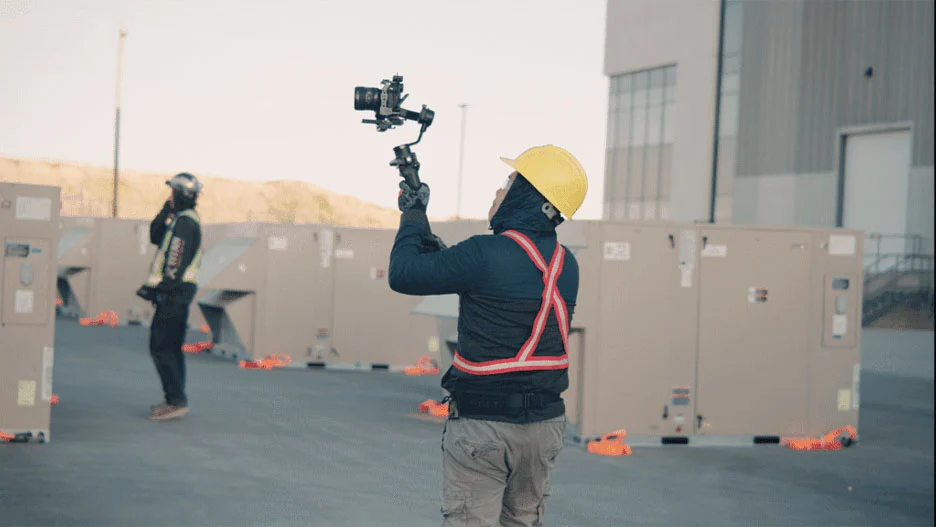
Personal protective equipment (PPE) is non-negotiable when filming on active sites. Even seasoned video professionals must follow the same rules as construction staff. The most common gear includes:
- Hard hats: Protect against falling debris.
- High-visibility vests: Ensure the crew is easily seen by operators of heavy machinery.
- Steel-toe boots: Provide protection and stability on uneven surfaces.
- Safety glasses: Shield eyes from dust and debris.
For drone filming, additional precautions may include setting up cordoned-off zones and ensuring that operators maintain line-of-sight at all times.
Emergency Procedures and Site Compliance
Every filming crew should be aware of the site’s evacuation plan, muster points, and first aid stations. Insurance coverage and liability waivers should also be in place before filming begins. This protects both the video production company and the client in case of unexpected incidents.
By following these safety protocols, crews demonstrate professionalism and respect for the site environment—qualities clients value highly.
Best Practices for Professional Site Walkthrough Videos
When shot lists, audio quality, and safety measures come together, the result is a professional-grade video that builds trust and delivers impact. Here are some industry best practices:
- Use stabilization gear: Tools like gimbals or steady cams ensure smooth footage even when walking across rough ground.
- Balance wide and close shots: Wide shots provide context, while close-ups showcase detail.
- Edit for clarity: Trim unnecessary footage, use captions for technical terms, and maintain a steady pacing to hold attention.
- Add branding elements: Company logos, color palettes, and intro/outro animations reinforce professionalism.
Ultimately, the goal is to make the video not just informative, but also engaging and aligned with the client’s brand identity.
One walkthrough usually becomes three deliverables — an internal cut, a client cut and a social clip. Our construction video editing workflow covers the versions and captions.
The same walkthrough footage can serve the site team as well as the client: narrated by a supervisor, it becomes part of a QA/QC video checklist that shows what was checked and whether corrective action was needed.
Why Choose Storimatic Studio for Site Walkthrough Videos

At Storimatic Studio, we combine technical expertise, modern equipment, and a safety-first approach to deliver site walkthrough videos that exceed client expectations. Our services include:
- High-definition 4K video recording with advanced stabilization tools.
- Professional-grade microphones and audio processing.
- Certified drone operators for stunning aerial perspectives.
- Experienced crews trained in site safety compliance.
- Expert editing to create polished, branded final products.
👉 Explore our full range of construction video services designed to help you communicate progress clearly and impress stakeholders.
Our mission is to help companies communicate clearly and confidently. Whether you need to document construction progress or showcase a new corporate facility, our team is ready to bring your vision to life.
Ready to produce a professional site walkthrough video? Contact Storimatic Studio today to discuss your project and get started.
Frequently Asked Questions (FAQ)
How long should a site walkthrough video be?
Most walkthrough videos run between 3–7 minutes. This length is long enough to cover important details without losing the viewer’s attention.
Can site walkthrough videos be live-streamed?
Yes. Live-streaming is becoming increasingly popular for real-time project updates. However, it requires reliable internet connectivity and additional planning for safety and equipment placement.
What’s the difference between a progress video and a walkthrough video?
A progress video often highlights specific milestones or achievements, while a walkthrough video offers a more comprehensive, step-by-step tour of the site. Many companies use both formats together for maximum impact.
Do I need professional voiceovers for my site walkthrough video?
Professional voiceovers add polish and clarity, making the video easier to follow. However, for internal updates, on-site narration may be sufficient. Many clients choose a combination of both.
How much does a professional site walkthrough video cost?
Costs vary based on factors like site size, equipment needed (e.g., drones), and editing complexity. At Storimatic Studio, we provide tailored quotes to match your budget and project requirements.
Conclusion
Site walkthrough videos are more than just recordings—they are powerful communication tools that document progress, demonstrate safety, and strengthen client trust. By focusing on detailed shot lists, professional audio, and strict safety protocols, you can ensure your videos achieve their purpose and stand out for quality.
With Storimatic Studio as your partner, you can be confident your walkthrough videos will be professional, safe, and impactful. Let’s bring your project’s story to life—clearly and beautifully. Planning a walkthrough on an active site? Talk to us, or see the full construction video production in Calgary service first.