
In a busy Calgary company, internal communication can feel like trying to drink from a firehose: emails, Teams pings, safety huddles, shift notes, and “quick updates” that somehow turn into long meetings. The result is predictable—messages get missed, training becomes inconsistent, and leaders repeat the same information over and over.
Key Takeaways
- Corporate video for internal communications turns important messages into clear, repeatable, on-demand content.
- It standardizes communication across roles, shifts, and locations, and cuts digital noise.
- Use a simple 3-layer system and short, repeatable formats employees actually watch.
- Track internal video KPIs that matter and start with a 30-day plan in 2026.
Corporate video for internal communications solves a very specific problem: it turns important messages into clear, repeatable, easy-to-share communication that your team can watch on their schedule—whether they’re in the office, at a job site, on a shop floor, or working remotely.
Why Corporate Video Works for Internal Communication in Calgary Businesses
It standardizes communication across roles, shifts, and locations
Calgary companies often run on multiple schedules: day/night shifts, site rotations, seasonal ramp-ups, and mixed office/field teams. Text-based communication tends to splinter—someone misses an email, someone hears a slightly different version in a meeting, and suddenly the team is executing inconsistent instructions.
Internal corporate video creates a single source of truth. A safety orientation video doesn’t change depending on who delivered it. A “new process” walkthrough is the same for everyone. And when you update a policy, you can re-issue one updated video (and archive the old version) so the organization stays aligned.
It reduces “digital debt” by cutting through the noise
Microsoft’s Work Trend Index has highlighted how modern work is overloaded by constant communication—so much that many employees struggle to find uninterrupted focus time and the time/energy to do their jobs effectively. When people are overwhelmed, long messages get ignored, skimmed, or misunderstood.
Short internal videos—especially when paired with captions and simple chapter headings—help employees absorb the “what changed” and “what to do next” quickly, without wading through a wall of text.
It improves clarity and retention (without relying on myths)
You’ve probably seen charts claiming people “remember 10% of what they read” and “90% of what they do.” Those numbers get shared a lot, but reputable learning organizations have repeatedly pointed out that this “pyramid” is not evidence-based and is often misattributed. Instead of leaning on questionable stats, the real advantage of video is practical: it shows what “good” looks like—steps, tools, environment, and real examples—so employees can replicate the standard.
In other words: video works because it’s demonstrative and repeatable, not because of a viral retention chart. It humanizes leadership and strengthens culture
Internal communications isn’t only about instructions—it’s also about trust. A 60–90 second leadership update filmed in a real Calgary workplace (shop, office, site) can do more for morale than a carefully written memo. People read text and assume tone; people watch video and understand tone.
This matters most during change: new systems, safety resets, growth periods, reorganizations, or tight deadlines. Video lets leaders explain the “why” with clarity—and recognize teams with authenticity.
When internal video delivers the highest ROI
- High turnover roles where onboarding is repeated constantly
- Safety-sensitive environments where consistency matters
- Multi-location operations across Calgary and surrounding areas
- Fast growth where culture and standards need reinforcement
- Complex processes better shown than explained
Internal video is one branch of a wider category that also covers brand, product, testimonial and event work; corporate video explained shows where internal communication fits among those types.
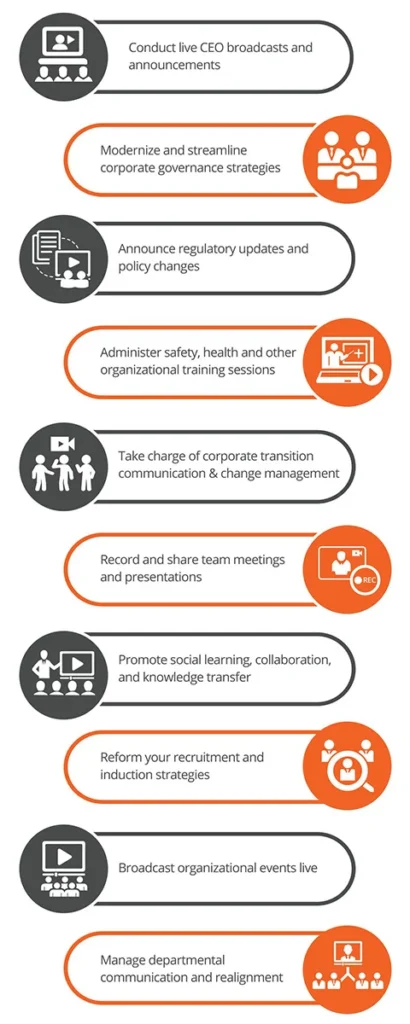
Top Internal Corporate Video Use Cases (With Calgary-Specific Examples)
If you’re building a smart internal video library, start with the videos that remove the most friction. Below are high-impact internal communications video formats Calgary companies commonly benefit from.
1) Leadership updates (CEO/GM messages)
Best for: alignment, priorities, trust, and momentum.
A consistent leadership update (monthly or quarterly) keeps your team pointed in the same direction: what matters this month, what’s changing, what’s working, and what support is coming. For Calgary operations teams, this is especially useful during seasonal shifts—winter readiness, spring ramp-up, peak construction season, or year-end planning.
- Keep it to 3 points max
- Use a clear structure: What happened → What’s next → What we need from you
- Include recognition: “Here’s who crushed it this month”
2) Onboarding videos that reduce ramp-up time
Best for: faster hiring, fewer repeated meetings, consistent standards.
Onboarding is where internal communication either becomes smooth—or becomes a constant drain on managers. A strong onboarding series typically includes:
- Welcome video: who you are, how you work, what you value
- Role expectations: what success looks like in the first 30/60/90 days
- People + pathways: who to contact, escalation routes, where to find resources
- Workplace basics: schedules, PPE rules, reporting, documentation standards
Real-world example: A Calgary construction company can reduce confusion by filming one “Day 1 on site” walkthrough—parking, sign-in, safety board, PPE check, who the foreman is, and how to report issues. Every new hire gets the same orientation before stepping onto the floor or site.
3) Training & SOP videos (how-to and refresher)
Best for: reducing rework, improving quality, protecting margins.
SOP videos are the backbone of corporate video for internal communications. Instead of writing a long procedure that no one reads, you create short, chapter-based videos that show:
- The goal of the task (what “done right” looks like)
- The exact steps (in the right order)
- Common mistakes (what causes rework)
- Quality checks (how to verify before moving on)
These work especially well in industries Calgary is known for—construction, energy services, logistics, manufacturing, and field service—where consistency equals safety and profitability.
4) Safety and compliance videos
Best for: risk reduction, consistency, and culture reinforcement.
Safety training often fails for one reason: it’s delivered differently every time. Video makes safety communication consistent—site orientation, hazard identification, incident reporting, vehicle and equipment checklists, and emergency procedures.
Pair these with short, periodic “safety refresh” clips (30–60 seconds) to reinforce one habit at a time—especially effective when teams are busy and attention is limited.
5) Change management and internal campaigns
Best for: adoption, clarity, reducing resistance.
When you roll out a new tool, process, or policy, the best internal videos do two things:
- Explain the why (what problem we’re solving)
- Show the how (what to do differently starting today)
Internal communications platforms increasingly emphasize video-first approaches because it improves engagement and speeds understanding—especially when messages would otherwise be long, complex, or easy to misinterpret.
6) Culture, recognition, and retention videos
Best for: morale, connection, and keeping good people.
Culture isn’t posters on a wall—it’s what gets repeated. Recognition videos (project wins, employee spotlights, customer shoutouts) help employees feel seen. For Calgary companies competing for talent, retention is a communication outcome: people stay where expectations are clear and contributions are appreciated.
7) Cross-department alignment videos
Best for: fewer handoff errors, better customer experience.
Think: sales to operations, dispatch to field, project management to crew leads, HR to supervisors. A short “handoff standard” video can prevent costly misunderstandings by clarifying what information must be shared, by when, and in what format.
Onboarding is the internal message most companies repeat most often, so it is worth building out properly: an employee onboarding video library groups welcome, role-specific, safety and SOP modules that new hires can watch before day one.
Choosing the Right Video Formats (Short, Repeatable, and Practical)
Not every internal message needs a full production. The best approach is a simple “format match”: pick the format that fits the message, the audience, and the shelf life of the content.
Format guide: what to make depending on your message
| Format | Best Use | Strength | Watch-Out |
|---|---|---|---|
| Talking-head update | Leadership messages, announcements | Fast to produce; highly human | Needs strong structure to avoid rambling |
| Voiceover + b-roll | Culture, internal campaigns, process overviews | Clear and polished; easy to follow | Requires planned visuals (b-roll list) |
| Screen recording tutorial | Software training, documentation workflows | Direct and practical; easy to update | Must use captions and callouts for clarity |
| On-site demo / SOP | Hands-on tasks, equipment processes | Shows “how,” not just “what” | Needs safety compliance and clean audio |
| Animated explainer | Policies, benefits, change management | Great for abstract topics; consistent branding | Can feel generic if not grounded in real examples |
Length recommendations (what works internally)
- 30–90 seconds: reminders, single-point updates, recognition clips
- 2–4 minutes: leadership recap, “why this matters,” process overview
- 5–10 minutes: deeper training—ideally split into chapters so employees can rewatch only what they need
Internal vs. external tone: what changes
Internal videos should be more direct than marketing videos. Less “brand story,” more “here’s the standard,” “here’s what changed,” and “here’s what good looks like.” That said, quality still matters—many people trust and engage more when video is clear, well-lit, and professionally edited (especially for leadership, onboarding, and safety).
Up next: we’ll build a simple internal video strategy (the 3-layer system) and a practical blueprint for planning, scripting, and producing internal communication videos your team will actually watch.
Optional quick win: If you want a starting point, choose one high-impact video to create this month: a 60-second leadership update, a Day 1 onboarding walkthrough, or one SOP that reduces rework. That single video often becomes the template for an entire internal library.
A Simple Internal Video Strategy (The 3-Layer System)
If you want corporate video for internal communications to actually “stick” inside your Calgary company, you need a simple system—something your team can repeat without burning out. The best approach we’ve seen is a three-layer strategy: a consistent rhythm, an evergreen library, and a plan for big moments.
Layer 1: “Heartbeat” updates (weekly or monthly)
Purpose: keep everyone aligned without adding more meetings.
Heartbeat videos are short leadership or departmental updates that answer three questions:
- What happened? (wins, metrics, lessons)
- What’s changing? (priorities, risks, staffing, timelines)
- What do we need from you? (one clear action)
These videos work especially well in high-noise workplaces. Microsoft’s research on the “infinite workday” points to frequent interruptions from meetings, email, and notifications—meaning clarity and brevity matter more than ever.
Layer 2: “Library” videos (onboarding, training, safety)
Purpose: reduce repeat questions and standardize training.
Library videos are evergreen assets that should live in one searchable home (SharePoint, intranet, LMS, or a structured Teams channel). Typical categories:
- Onboarding: Day 1 walkthrough, roles, who’s who, expectations
- Training/SOP: step-by-step procedures, quality checks, common mistakes
- Safety: orientation, hazard awareness, reporting workflows
- Customer standards: how you represent the brand on site/in the field
Layer 3: “Moments that matter” videos (change, crisis, growth)
Purpose: improve adoption and trust during important shifts.
Use this layer for big transitions: new software, new policy, a safety reset, a merger, a re-org, or a major milestone. A clear internal video delivered at the right time can prevent weeks of confusion and rumor-chasing.
Editorial calendar example (a realistic first 90 days)
| Month | Heartbeat | Library | Moments That Matter |
|---|---|---|---|
| Month 1 | Leadership “Top 3 priorities” | Onboarding welcome + “How we work” | Seasonal ramp-up message (if applicable) |
| Month 2 | Ops update + recognition | Safety orientation + 2 critical SOPs | New process rollout explainer |
| Month 3 | Department wins + next steps | Quality checklist video + customer standards | All-hands recap / culture spotlight |
Even internally, video reinforces how employees represent the company. This article on building strong brand identity through corporate video in Calgary explains how internal and external messaging stay aligned.
On construction projects the heartbeat idea extends beyond staff to owners, investors and partners: stakeholder update videos apply the same regular cadence, with a set format and KPIs, to keep project progress visible outside the company.
Pre-Production Planning: The Internal Video Blueprint
Most internal videos fail for one reason: they’re filmed before the message is structured. Pre-production is where internal communication videos become clear, short, and useful.
Step 1: Define the single goal (one video = one outcome)
Pick one measurable outcome. Examples:
- Reduce repeat questions from new hires
- Improve compliance with a safety procedure
- Decrease rework by clarifying a standard
- Increase adoption of a new tool or process
Rule: if your video has more than one goal, it becomes easier to ignore.
Step 2: Identify the viewer and their reality
Internal communications in Calgary often include mixed contexts—office staff with laptops, field crews on phones, noisy environments, and multiple languages. Plan for:
- Where they’ll watch: Teams on a phone, break room TV, intranet on desktop
- How long they have: 60 seconds between tasks is common
- Accessibility: captions for noisy environments and hearing accessibility
Captions aren’t just “nice to have”—they’re a core accessibility requirement for prerecorded video content under WCAG guidance, and they also help employees understand videos in loud workplaces.
Step 3: Script for clarity (not “corporate fluff”)
A strong internal script is simple and direct. Use this structure:
- Context: what’s happening
- Reason: why it matters
- Standard: what we’re doing now
- Example: what “good” looks like
- Action: what to do next
Copy/paste script template:
- Hook: “Here’s the problem we’re solving…”
- Change: “Starting today, we’re doing…”
- 3 key points: “Remember these three things…”
- What good looks like: “A great example is…”
- CTA: “Your next step is…”
Step 4: Plan the visuals (so employees don’t tune out)
For internal corporate video, visuals are not decoration—they’re proof. Build a quick b-roll list:
- The real workplace (Calgary office, shop, site, fleet, warehouse)
- Close-ups of the steps that matter (tools, forms, checklists, screens)
- Before/after or right/wrong comparisons (where appropriate)
- On-screen text for the non-negotiables (3 key rules, steps, safety points)
Step 5: Choose the production approach (DIY, hybrid, or pro)
Use the right level of production for the shelf life and risk level:
- DIY: quick updates, screen recordings, short reminders
- Hybrid: leadership updates with a consistent template + occasional professional shoots
- Professional: onboarding series, safety training, high-impact change management, culture/recognition content
While internal communications require clarity and consistency, not every video serves the same purpose. If you’re deciding between internal corporate video and social-first content, this breakdown of Corporate video vs social-media video for Calgary businesses helps clarify which format fits each goal.
Production Best Practices (So Employees Actually Watch)
Keep it short, structured, and skimmable
Internal viewers don’t need “perfect.” They need clear. Add structure that makes your video easy to follow:
- On-screen headings (“Step 1,” “Step 2,” “Common Mistakes”)
- Chapter cards for longer training
- Simple graphics for rules, checklists, and numbers
Audio and lighting matter more than 4K
Employees will forgive a plain background. They won’t forgive muffled audio. Prioritize:
- A clean mic (lav or shotgun)
- Quiet-ish location (or controlled audio capture)
- Consistent lighting so faces and details are visible
Use real people and real locations
Authenticity is the fastest trust-builder. For internal communications video, a real supervisor demonstrating a real SOP is more persuasive than a generic actor. It signals: “This is our standard, in our environment.”
Accessibility: captions, transcripts, and clarity
Captions help everyone: hearing accessibility, noisy environments, and faster skimming. Many workplaces already use tools that support transcripts and captions for internal video (for example, Microsoft 365 video workflows).
Distribution in the Real World: Where Internal Videos Should Live
Even the best video fails if no one can find it. The goal is to meet employees where they already work—then maintain one clean “home” for your library.
Best channels for Calgary companies
- Microsoft Teams: quick updates, announcements, leadership clips
- SharePoint / Intranet: searchable library, policies, onboarding hub
- Email: for launch announcements (link to a single source of truth)
- LMS: training completion tracking and refresher cycles
- QR codes on-site: posters in break rooms, shop walls, site trailers
How to launch internal videos so they don’t flop
- Explain the benefit: “This saves you time and reduces rework.”
- Make it part of routine: weekly huddle, onboarding checklist, safety meeting opener
- Get visible leadership support: a 15-second intro from a leader goes far
- Ask one question: “What’s unclear?” and fix it in the next version
Governance: keep one source of truth
Create simple rules so your internal video library stays trustworthy:
- Naming: “SAFETY – Incident Reporting – v2 – 2026-01”
- Owners: one person responsible per category
- Review dates: quarterly for SOP/safety, annually for evergreen culture
- Archive old versions: prevent outdated instructions from spreading
Measuring Success (Internal Video KPIs That Actually Matter)
Internal communications video isn’t “marketing measurement.” You’re looking for clarity, adoption, and behavior change.
Engagement metrics
- Completion rate: how many watched to the end
- Drop-off points: where viewers leave (usually where clarity drops)
- Repeat views: often a sign the video is actually useful
Operational metrics (the ones leadership cares about)
| Video Type | Operational Metric to Track | What “Improvement” Looks Like |
|---|---|---|
| Onboarding | Time-to-productivity | New hires ramp faster with fewer repeat questions |
| SOP / Quality | Rework rate | Fewer mistakes, fewer callbacks, cleaner handoffs |
| Safety | Near-miss reporting + incidents | More reporting awareness and safer behaviors over time |
| Change rollout | Adoption rate | Faster uptake of the new process/tool |
Why recognition content matters (real data)
Culture videos aren’t “soft” when retention is expensive. Gallup reports that employees receiving high-quality recognition were significantly less likely to leave, based on longitudinal findings from 2022–2024. That makes recognition and culture content a practical internal communications investment—not fluff.
Safety training credibility (real research)
If you’re using video for safety, it helps to know the broader evidence base: a peer-reviewed meta-analysis examined safety and health training across industries and found training interventions generally improve safety knowledge and behaviors. Video alone isn’t magic—but structured training (especially standardized) is consistently beneficial when designed well.
Common Mistakes Calgary Companies Make (And How to Avoid Them)
Trying to say everything in one video
Fix: break it into a series. One video = one outcome. If you need to cover five topics, make five videos.
Overproducing style and under-delivering clarity
Fix: write a tight script first, then add visuals that prove the point.
No rollout plan
Fix: define the owner, the publishing schedule, the “home” (source of truth), and the feedback loop.
Ignoring frontline realities
Fix: involve supervisors, foremen, and team leads in planning—and always include captions for noisy environments and accessibility.
Internal Video Starter Pack: A 30-Day Plan
Week 1: Audit + priority list
- List the top 10 repeat questions managers get asked
- Identify the top 5 risk areas (safety, quality, customer handoffs)
- Pick 3 videos that remove friction fast
Week 2: Create templates + a distribution hub
- Set a standard intro/outro, lower-thirds, and caption style
- Create a folder structure and naming convention
- Choose the home: SharePoint/intranet/LMS + a Teams channel for announcements
Week 3: Produce 3 “quick win” videos
- Leadership update (60–90 seconds)
- Day 1 onboarding walkthrough (2–4 minutes)
- One SOP or safety module that prevents rework or incidents
Week 4: Launch + measure + iterate
- Publish with a clear “why it matters” message
- Track completion and feedback
- Update the next set of videos based on real questions and drop-off points
How Storimatic Studio Helps Calgary Teams Communicate Internally With Video
At Storimatic Studio, we help Calgary companies use corporate video for internal communications in a way that’s practical, repeatable, and aligned with real operations.
What you get
- Strategy + planning: choose the right formats and build an internal video system
- Scripting support: clear, structured messaging that respects employees’ time
- Professional filming: real locations, real teams, clean audio, strong visuals
- Editing built for internal viewing: chapters, captions, on-screen callouts, reusable templates
Recommended internal video packages
- Starter (Quick Wins): 3-video set (Leadership + Onboarding + SOP/Safety)
- Growth (Library Build): onboarding series + role-based SOP library + quarterly updates
- Operations (Safety & Standards): safety training series + quality/checklist videos + change rollouts
If you want a clear internal video plan (topics, formats, rollout, and distribution), contact Storimatic Studio through storimaticstudio.com to book a strategy call and get a tailored quote for your Calgary team.
Storimatic films internal pieces the same way as client-facing work, with real teams, real locations and clean audio; our corporate video and internal communication service covers company profiles and executive messages for Calgary employers.
FAQ: Corporate Video for Internal Communications (Calgary)
How long should internal communication videos be?
Most internal videos perform best between 30–90 seconds for updates and reminders, and 2–4 minutes for onboarding or process overviews. For deeper training, split content into chapters so employees can rewatch only what they need.
Where should we host internal corporate videos?
Use the platform employees already open daily (often Teams), but keep a single source-of-truth library on SharePoint/intranet/LMS. This prevents outdated versions from circulating.
Do internal videos need professional production?
Not always. DIY works for quick updates and screen recordings. But for onboarding, safety, and high-impact change communications, professional production often improves clarity, credibility, and completion—especially with strong audio, lighting, and structured editing.
How do we get employees to actually watch?
Make videos short, practical, and tied to real outcomes. Launch them inside existing routines (huddles, onboarding steps, safety meetings), keep captions on by default, and ask one simple feedback question to improve the next version.
Should we add captions and transcripts?
Yes. Captions support accessibility and help employees watch in noisy environments. WCAG guidance includes captions as a key requirement for prerecorded video content, and many workplace tools support transcripts and captions for internal videos.
Can we reuse internal footage for external marketing later?
Often yes—if you plan for it. The key is permissions, confidentiality, and capturing extra “clean” b-roll that can be safely used externally. A good production plan can intentionally capture both internal and external-friendly assets in one shoot.
Conclusion: Turn Internal Messages Into Alignment (Not Noise)
Internal communication gets harder as companies grow—more people, more locations, more systems, more messages. Corporate video for internal communications gives Calgary teams a practical advantage: clear, repeatable communication that reduces confusion, strengthens culture, and supports safer, more consistent operations.
- Start with the highest-impact use cases: leadership updates, onboarding, SOP, safety, and change rollouts
- Use the 3-layer system: heartbeat + library + moments that matter
- Win with clarity: short scripts, real examples, captions, and a single source of truth
- Measure what matters: completion + operational outcomes (ramp time, rework, incidents, adoption)
Ready to build your internal video system? Storimatic Studio can help you plan, film, and deploy a professional internal video library for your Calgary company—so your team spends less time decoding messages and more time doing great work.